

What is VPC peering?
VPC peering is a networking connection between two VPCs that enables routing traffic between them using private IPv4 or IPv6 addresses. Traffic stays on the AWS backbone — it never traverses the public internet, and it is not encrypted in transit beyond what AWS already provides at the physical layer.
A VPC peering connection is neither a gateway nor a VPN. It is a 1-to-1 private connection at the routing layer. Both VPCs behave as if they share a single flat network from a routing perspective — but only for that specific pair.
Peering works across accounts and across regions. An AWS account in us-east-1 can peer with an account in eu-west-1. The connection uses the same pcx resource model regardless of account or region boundaries.
How VPC peering works
When you create a peering connection, AWS assigns it a peering connection ID in the format pcx-xxxxxxxx. Creating the connection is just the first step — nothing routes through it until you update route tables on both sides.
The setup requires three things:
- Create and accept the peering connection. The requester initiates; the accepter must explicitly accept. For same-account peerings you can skip this step with
auto_accept. - Add routes in both VPCs. Each VPC's route table needs an entry pointing to the peer's CIDR via the pcx ID.
- Update security groups. Resources in each VPC must allow traffic from the peer's CIDR block — or, for same-region peerings, you can reference the peer security group by ID.
Here is the full setup via AWS CLI:
# Create peering connection (from requester account)
aws ec2 create-vpc-peering-connection \
  --vpc-id vpc-aaa \
  --peer-vpc-id vpc-bbb \
  --peer-region us-east-1

# Accept the connection (from accepter account/region)
aws ec2 accept-vpc-peering-connection \
  --vpc-peering-connection-id pcx-xxxxx

# Add route in requester VPC pointing to accepter CIDR
aws ec2 create-route \
  --route-table-id rtb-aaa \
  --destination-cidr-block 10.1.0.0/16 \
  --vpc-peering-connection-id pcx-xxxxx

# Add route in accepter VPC pointing back to requester CIDR
aws ec2 create-route \
  --route-table-id rtb-bbb \
  --destination-cidr-block 10.0.0.0/16 \
  --vpc-peering-connection-id pcx-xxxxx
If you have multiple route tables (common with public/private subnet separation), you need to add routes to each one where you want the peering to be reachable. Missing a route table is the most common reason peering appears to work for some subnets but not others.
Cross-account and cross-region peering
Cross-account peering works identically at the technical level but requires the accepter account to log in and accept the request. You cannot force-accept from the requester side. The pcx ID appears as a pending request in the accepter's EC2 console and via describe-vpc-peering-connections.
For DNS hostname resolution across accounts, you must enable DNS resolution support on both sides explicitly:
aws ec2 modify-vpc-peering-connection-options \
  --vpc-peering-connection-id pcx-xxxxx \
  --requester-peering-connection-options AllowDnsResolutionFromRemoteVpc=true

aws ec2 modify-vpc-peering-connection-options \
  --vpc-peering-connection-id pcx-xxxxx \
  --accepter-peering-connection-options AllowDnsResolutionFromRemoteVpc=true
Without this, EC2 instances in the peer VPC resolve each other's private DNS names to public IPs — traffic still flows, but it routes through the internet rather than the peering connection.
Cross-region peering is supported but comes with additional considerations:
- Latency is inter-region, not just cross-AZ. Plan accordingly for synchronous calls.
- Data transfer pricing applies at inter-region rates rather than the standard same-region rates.
- DNS hostname resolution must be enabled separately per side, same as cross-account.
Data transfer pricing:
| Scenario | Cost |
|---|---|
| Same region, same AZ | Free |
| Same region, cross-AZ | $0.01/GB each way |
| Cross-region | Standard inter-region rates (varies by region pair) |
The peering connection itself has no hourly charge. You pay only for data that moves through it.
VPC peering limits and restrictions
The most important restriction is non-transitive routing. If VPC A peers with VPC B, and VPC B peers with VPC C, VPC A cannot reach VPC C through VPC B. Traffic from A to C would need to be routed directly — either via a direct A↔C peering, or via a Transit Gateway.
This is not a technical limitation you can work around with creative routing. AWS explicitly does not allow it.
Other restrictions to be aware of:
- No edge-to-edge routing. You cannot use a peer VPC's VPN, Direct Connect gateway, or internet gateway. Each VPC must have its own on-premises or internet connectivity.
- No overlapping CIDRs. CIDR ranges between peered VPCs must not overlap. Plan your VPC CIDR allocations before you build — retrofitting is painful.
- Limit of 125 peering connections per VPC (soft limit, adjustable via support request).
- IPv6 requires both VPCs to have IPv6 enabled. You cannot peer for IPv6-only traffic if one side lacks IPv6 CIDR blocks.
- Peering connections cannot be modified once created. To change a CIDR, you must delete and recreate the connection.
When VPC peering makes sense
VPC peering is a good fit when:
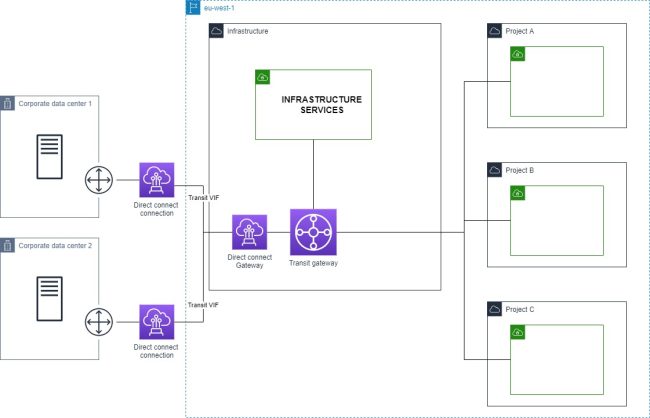
- You have a simple hub-and-spoke topology: one shared services VPC (DNS, logging, bastion hosts, artifact repositories) connected to a small number of project or workload VPCs.
- You have fewer than 10 VPCs and don't anticipate significant growth.
- Latency matters. Peering has slightly lower latency than Transit Gateway because there is no intermediate hop — traffic routes directly between the two VPCs.
- Cost is a constraint. The peering connection is free. You pay only for data transfer, and within the same AZ that is also free.
VPC peering is a poor fit when:
- You need transitive routing — this is a hard architectural requirement that peering cannot fulfill.
- You are building a full mesh between many VPCs. The number of required connections grows as n*(n-1)/2. Ten VPCs require 45 peering connections; 20 VPCs require 190. Managing route tables at that scale becomes error-prone and operationally expensive.
- You need shared connectivity — a single VPN or Direct Connect circuit shared across many VPCs. Peering cannot forward traffic to an attached gateway.
- Your environment has 10+ VPCs and will keep growing.
Security group configuration for peering
Route table entries get traffic to the peer VPC — but security groups determine whether that traffic is actually accepted at the destination resource. Both sides require explicit inbound rules.
Same-region peering supports security group referencing: instead of specifying the peer CIDR, you can reference the peer's security group ID directly. This is more precise and avoids having to update security group rules if the peer VPC's CIDR changes.
# Allow inbound on port 5432 from a specific security group in the peer VPC
aws ec2 authorize-security-group-ingress \
  --group-id sg-destination \
  --protocol tcp \
  --port 5432 \
  --source-group sg-peer-app \
  --group-owner 123456789012
The --group-owner parameter is the AWS account ID that owns the referenced security group. For same-account peerings you can omit it; for cross-account peerings it is required.
Cross-region peering does not support security group referencing — you must use CIDR blocks. This is a meaningful restriction: if the peer VPC's CIDR ever changes (unlikely, but possible), you need to update every security group rule that references it.
A common mistake is updating the route table on one side of the peering but not the security group. The connection appears misconfigured — traffic is routed to the peer but immediately rejected. Always verify both the routing and security group rules when debugging a peering connectivity issue.
Terraform example
resource "aws_vpc_peering_connection" "main" {
  vpc_id      = aws_vpc.requester.id
  peer_vpc_id = aws_vpc.accepter.id
  auto_accept = true  # only works same account/region

  tags = { Name = "requester-to-accepter" }
}

resource "aws_route" "requester_to_accepter" {
  route_table_id            = aws_vpc.requester.main_route_table_id
  destination_cidr_block    = aws_vpc.accepter.cidr_block
  vpc_peering_connection_id = aws_vpc_peering_connection.main.id
}

resource "aws_route" "accepter_to_requester" {
  route_table_id            = aws_vpc.accepter.main_route_table_id
  destination_cidr_block    = aws_vpc.requester.cidr_block
  vpc_peering_connection_id = aws_vpc_peering_connection.main.id
}
For cross-account peering, auto_accept cannot be used. The standard pattern is to use a separate aws_vpc_peering_connection_accepter resource in the accepter account's Terraform configuration, referencing the same vpc_peering_connection_id. This usually lives in a separate Terraform workspace or module.
For cross-region peering, add the peer_region argument and configure the AWS provider for the accepter region:
resource "aws_vpc_peering_connection" "cross_region" {
  vpc_id        = aws_vpc.requester.id
  peer_vpc_id   = aws_vpc.accepter.id
  peer_region   = "eu-west-1"
  auto_accept   = false

  tags = { Name = "us-east-1-to-eu-west-1" }
}
Visualizing VPC peering with VizCon
When you have multiple peering connections — especially cross-account — the topology becomes hard to track in the AWS Console. You end up clicking through route tables in multiple accounts to verify that both sides of each connection are correctly configured.
VizCon auto-discovers all peering connections across your AWS accounts and renders them in a network diagram alongside subnets, security groups, and route tables. Instead of manually tracing route table entries, you can see at a glance which VPCs are peered, verify that routes exist on both sides, and confirm that security groups permit the expected traffic — all in one view without switching between accounts or regions.