
The core question
Both VPC peering and AWS Transit Gateway connect VPCs. The choice between them affects cost, routing complexity, scalability, and what becomes possible (or impossible) in your network architecture. It is one of the most consequential networking decisions for teams moving beyond a handful of VPCs.
The short version: VPC peering is simpler and cheaper at small scale; Transit Gateway is operationally necessary at larger scale or when you need shared connectivity to on-premises networks. The crossover point is roughly 5–10 VPCs, or the moment you need transitive routing.
How each works
VPC Peering creates a direct 1-to-1 encrypted connection between two VPCs. Traffic routes over the AWS backbone without any intermediate hop. Each VPC's route table requires an explicit entry pointing to the peer's CIDR via the peering connection ID (pcx-xxxxxxxx). Security groups on the resources must permit traffic from the peer CIDR. The connection is non-transitive: if A peers with B and B peers with C, A and C cannot communicate through B.
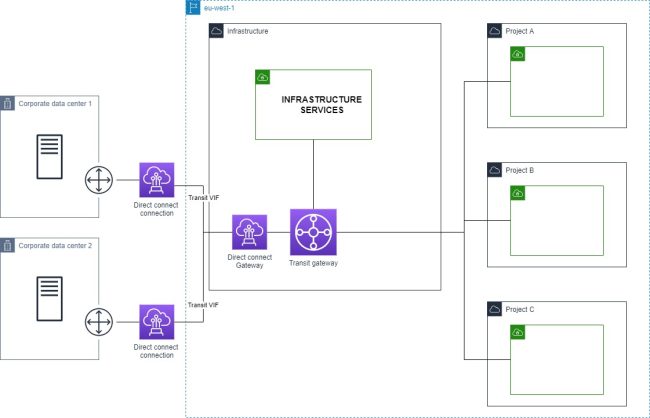
Transit Gateway (TGW) is a regional network hub. VPCs, VPN connections, and Direct Connect gateways attach to it. A TGW has its own route tables — you control which attachments can route to which other attachments by managing route table associations and propagations. Routing is transitive by default once attachments are associated with the same route table. One TGW attachment per VPC is all you need, regardless of how many other VPCs that VPC needs to communicate with.
Feature comparison
| Feature | VPC Peering | Transit Gateway |
|---|---|---|
| Transitive routing | No | Yes |
| Cross-account | Yes | Yes |
| Cross-region | Yes (direct peering) | Yes (TGW peering) |
| Max connections | 125 peering connections/VPC | 5,000 attachments/TGW |
| Bandwidth limit | No limit | 50 Gbps burst/attachment |
| Latency | Slightly lower (direct) | Slightly higher (one extra hop) |
| Peering/attachment cost | Free | $0.05/attachment/hour |
| Data transfer cost | Standard rates | $0.02/GB processed |
| Route management | Per-VPC route tables | Centralized TGW route tables |
| VPN/Direct Connect sharing | No | Yes |
| Traffic inspection (GWLB) | No | Yes (via centralized inspection VPC) |
| Routing policy (prod/dev isolation) | Possible but complex | Straightforward (separate route tables) |
When to use VPC peering
VPC peering is the right choice when:
Scale is limited. If you have five or fewer VPCs and that number is unlikely to grow significantly, peering gives you what you need without the Transit Gateway overhead. Hub-and-spoke with one shared services VPC connected to three or four workload VPCs is a straightforward configuration.
Cost is a priority. The peering connection itself costs nothing. You pay only for data transfer — and within the same availability zone, same-region peering is free. At low data volumes, peering is strictly cheaper than Transit Gateway.
Latency matters. VPC peering has slightly lower latency because traffic routes directly between the two VPCs with no intermediate hop. The difference is small (single-digit milliseconds at most) but measurable for latency-sensitive workloads.
You don't need transitive routing. If your topology is genuinely point-to-point or hub-and-spoke (not a mesh), peering works cleanly.
# Verify peering connection status
aws ec2 describe-vpc-peering-connections \
  --filters "Name=status-code,Values=active" \
  --query 'VpcPeeringConnections[].{ID:VpcPeeringConnectionId,Requester:RequesterVpcInfo.VpcId,Accepter:AccepterVpcInfo.VpcId}' \
  --output table
When to use Transit Gateway
Transit Gateway is the right choice when:
You have 10 or more VPCs. Full-mesh peering between n VPCs requires n*(n-1)/2 connections. Ten VPCs need 45 connections, each with two sets of route table entries to manage. At 20 VPCs that is 190 connections. The operational overhead — and the surface area for misconfiguration — becomes unacceptable. TGW reduces this to one attachment per VPC regardless of how many other VPCs it needs to reach.
You need to share VPN or Direct Connect. A VPN or Direct Connect gateway attached to a single VPC cannot be accessed by peered VPCs — there is no edge-to-edge routing in peering. With Transit Gateway, you attach the VPN or DX gateway to the TGW once and all attached VPCs can reach the on-premises network through it.
You need centralized traffic inspection. Inserting a Network Firewall or a third-party firewall appliance into your network path requires transitive routing. The standard pattern is a centralized inspection VPC attached to the TGW, with a TGW route table that routes all traffic through it via Gateway Load Balancer. This is impossible to implement with VPC peering alone.
You need routing policy between environments. With TGW, you create separate route tables for production and development attachments. Production VPCs associate with the prod route table, which does not propagate dev VPC routes — they are simply unreachable. Achieving the same isolation with peering requires careful management of which connections exist and which security group rules are in place across every VPC.
You are building multi-account architecture. TGW works cleanly with AWS Resource Access Manager (RAM) to share the gateway across accounts. Peering across many accounts means managing individual connection requests and acceptances for each pair.
Cost comparison with a concrete example
10 VPCs, full mesh, 1 TB cross-AZ traffic/month:
Peering:
- 45 peering connections (no hourly cost)
- Data transfer: 1 TB × $0.01/GB × 2 (each way) = $20/month
- Route table entries to manage: 45 × 2 = 90 entries across all VPCs
Transit Gateway:
- 10 attachments × $0.05/hour × 730 hours = $365/month
- Data processed: 1 TB × $0.02/GB = $20/month
- Total: $385/month
- Route table entries to manage: 10 propagations in one centralized TGW route table
At 10 VPCs with modest traffic, peering is dramatically cheaper. But the $365/month buys you transitive routing, shared VPN access, centralized inspection capability, and a route table you manage in one place instead of across 10 VPCs in potentially multiple accounts.
For fewer than 5 VPCs with low data volumes: peering wins on cost almost every time.
For 10+ VPCs or any shared connectivity requirement: TGW's operational benefits typically justify the cost. Engineering time spent managing 90+ route table entries across multiple accounts has a real cost that the Transit Gateway fee easily offsets.
Setting up Transit Gateway (AWS CLI)
# Create the Transit Gateway
aws ec2 create-transit-gateway \
  --description "Production network hub" \
  --options AmazonSideAsn=64512,AutoAcceptSharedAttachments=disable,DefaultRouteTableAssociation=enable,DefaultRouteTablePropagation=enable

# Attach a VPC
aws ec2 create-transit-gateway-vpc-attachment \
  --transit-gateway-id tgw-xxxxxxxxx \
  --vpc-id vpc-aaa \
  --subnet-ids subnet-111 subnet-222 \
  --tag-specifications 'ResourceType=transit-gateway-attachment,Tags=[{Key=Name,Value=prod-vpc-attachment}]'

# Add a route in the VPC route table pointing to the TGW
aws ec2 create-route \
  --route-table-id rtb-aaa \
  --destination-cidr-block 10.0.0.0/8 \
  --transit-gateway-id tgw-xxxxxxxxx
Unlike peering, where routes must be individually added for each destination CIDR, with TGW you typically add a summary route covering your entire private IP space (10.0.0.0/8 or your internal supernet) and let the TGW route table handle the specifics.
The hybrid approach
The two options are not mutually exclusive. A common production pattern is to use Transit Gateway as the primary hub for all standard VPC-to-VPC and on-premises connectivity, while using direct VPC peering for specific high-bandwidth pairs where the lower latency and zero data processing cost of peering is worth the additional connection to manage.
For example: a Transit Gateway connecting 15 VPCs across three accounts for general connectivity, plus a direct peering connection between two microservice VPCs that exchange several terabytes per month and are latency-sensitive. The TGW handles routing policy and VPN sharing; the peering handles the hot path.
# Terraform: TGW attachment + peering side-by-side
resource "aws_ec2_transit_gateway_vpc_attachment" "main" {
  transit_gateway_id = aws_ec2_transit_gateway.main.id
  vpc_id             = aws_vpc.workload.id
  subnet_ids         = aws_subnet.private[*].id
}

# Direct peering for high-bandwidth pair
resource "aws_vpc_peering_connection" "hot_path" {
  vpc_id      = aws_vpc.service_a.id
  peer_vpc_id = aws_vpc.service_b.id
  auto_accept = true
}
Visualizing the topology with VizCon
In the AWS Console, understanding the actual routing between VPCs connected via Transit Gateway requires navigating TGW route tables, VPC route tables, and attachment associations — across multiple accounts, possibly multiple regions. A misrouted propagation or a missing association is easy to overlook.
VizCon renders the full multi-VPC topology in a single diagram: TGW attachments, VPC peering connections, route propagations, and the resulting reachability between resources. When you need to verify that your routing policy is actually enforced — that production VPCs cannot reach development, that on-premises traffic is correctly flowing through the shared inspection VPC — you get the answer from the diagram rather than by manually tracing route table entries across accounts.